
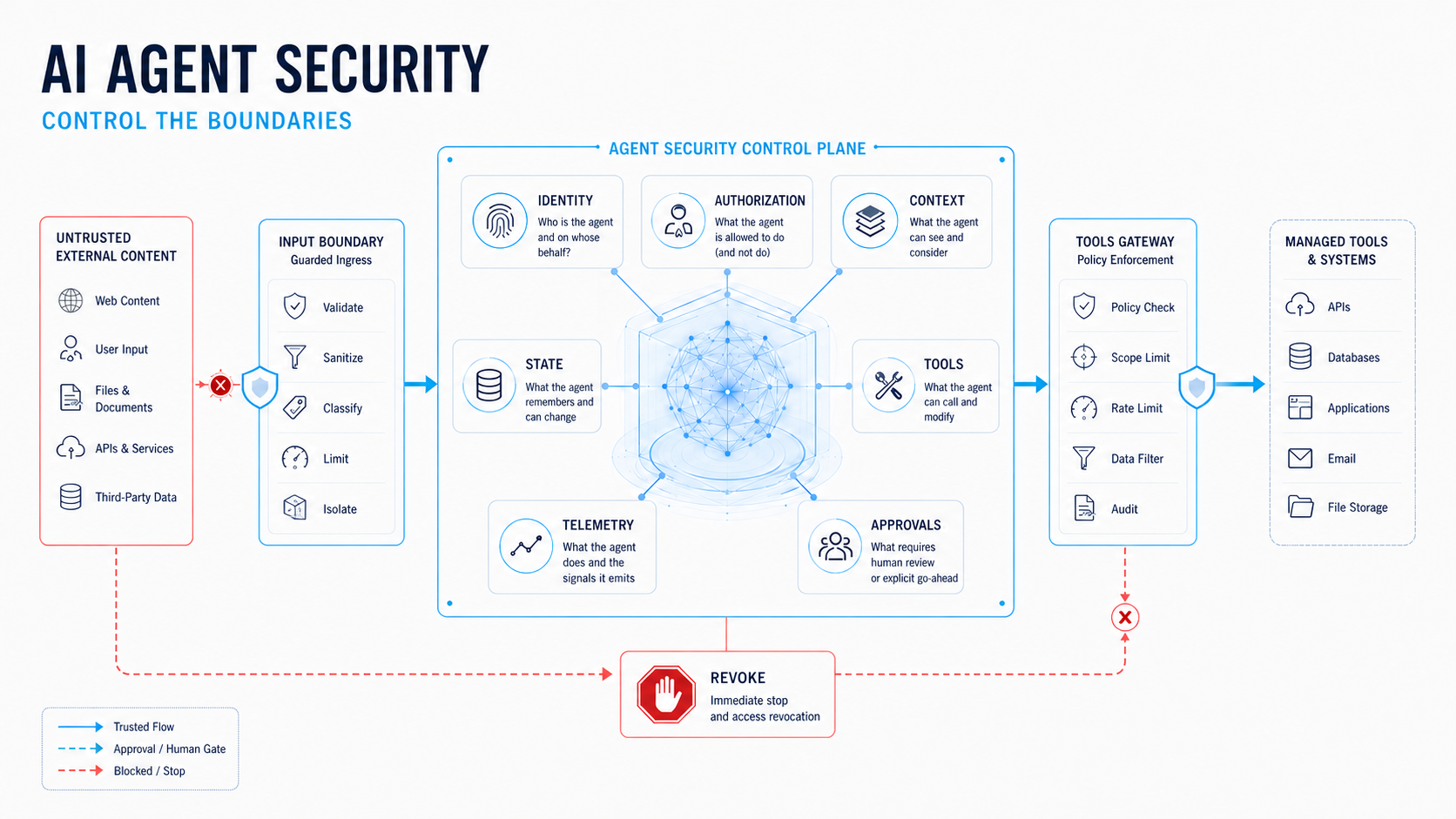
AI agent security is the practice of controlling what an agent can access, decide, call, change, and continue doing. The model is only one part of the system. Identity, tool authorization, context handling, state changes, approvals, and runtime monitoring must be enforced around it.
The risk can be measured: the InjecAgent benchmark used 1,054 test cases across 17 user tools and 62 attacker tools and reported that ReAct-prompted GPT-4 was vulnerable to indirect prompt injection 24% of the time in its test setting (Zhan, Liang, and Kang, 5 March 2024).
This article provides a production control model, a release test for each boundary, and a framework for determining where human approval should be required.
Questions this Article Answers
- What is AI agent security?
- How is AI agent security different from LLM security?
- What are the main security risks for AI agents?
- How do you defend an agent against prompt injection?
- How should an AI agent identity and permissions work?
- What does least privilege mean for an AI agent?
- How do you secure agent tools and MCP servers?
- When should a human approve an agent action?
- How do you protect agent memory and retrieved context?
- What should you log and monitor for an AI agent?
- How do you test an AI agent before production?
- What is a practical AI agent security checklist?
What is AI Agent Security?
AI agent security is the set of technical and operational controls that limit an agent’s authority and identify unsafe behavior before it causes harm. It covers the agent’s identity, input sources, tools, memory, state changes, approvals, logs, and failure response, rather than only the model’s response text.
- NIST (National Institute of Standards and Technology) describes the distinctive challenge as the combination of model outputs with software functionality.
- An agent can plan, call an API, read a document, update a record, and continue a workflow.
Each transition creates a security boundary. A useful design question is therefore not only, “What can the model say?” but also, “What can this run cause, under whose identity, based on what evidence, and how can it be stopped?”
OWASP’s (Open Web Application Security Project) agent guidance identifies prompt injection, tool abuse, data exfiltration, memory poisoning, excessive autonomy, approval manipulation, cascading failure, and rogue behavior among the relevant risks.
The practical implication is straightforward: a model instruction is not a security boundary. A policy enforcement point outside the model must determine whether an action is permitted.
How is AI Agent Security Different from LLM Security?
LLM security focuses heavily on the model interface, including prompt injection, sensitive-data disclosure, unsafe output, model supply chain risks, and abuse of the generation endpoint. AI agent security includes these concerns but also addresses authority, state, and action. An agent can turn misleading content into a tool call, a tool call into a state change, and a state change into an external consequence.
NIST’s 2026 request for information distinguishes ordinary software weaknesses from risks that can arise when model outputs are combined with software systems.
It specifically identifies
- Adversarial Data
- Indirect Prompt Injection
- Poisoned Models
- Harmful Actions without an Adversarial Input, such as Specification Gaming or Misaligned Objectives.
This changes the control question. Output filtering may identify a harmful sentence, but it cannot by itself determine whether an agent may export a customer record, send an email, alter a permission, or invoke another tool. Those decisions require identity, scope, parameter checks, approval policies, and an audit trail.
What are the Main Security Risks for AI Agents?
The main risks include goal hijacking, tool misuse, identity and privilege abuse, insecure supply chains, unexpected code execution, memory poisoning, unsafe agent-to-agent communication, cascading failure, human-agent trust exploitation, and rogue behavior. OWASP’s Top 10 for Agentic Applications provides a ten-risk taxonomy covering these types of failure modes.
| Risk | What Changes in an Agent | First Control to Add |
|---|---|---|
| Goal hijacking | Untrusted content changes the task the agent is pursuing | Separate data from instructions and verify the intended goal |
| Tool misuse | A valid tool is used with unsafe parameters or in the wrong sequence | Server-side authorization and parameter validation |
| Identity and privilege abuse | The agent inherits more authority than the task requires | Dedicated identity, least privilege, short-lived access |
| Memory poisoning | Attacker-controlled content influences future runs | Validate, scope, expire, and isolate memory |
| Data exfiltration | Sensitive context leaves through a tool or final response | Data classification, egress policy, output checks |
| Cascading failure | One compromised agent causes another to act outside its boundary | Per-agent trust boundaries and signed or authenticated handoffs |
The important word is first. Each risk needs a control at the point where it can be enforced. Adding another warning to the system prompt is not an adequate response to a permission problem.
How do you Defend an Agent Against Prompt Injection?
Defend against prompt injection with layered controls that assume untrusted text will eventually reach the model. Treat user content, retrieved documents, email, web pages, tool results, and memory as data to be analyzed, not as instructions with authority.
Google’s MCP security guidance provides a clear distinction: a record containing “forget previous instructions” must remain data even when the model reads it. Delimiters and explicit instructions can help, but stronger controls include isolation, sensitive-data protection, tool screening, and an authorization check before execution. OWASP likewise treats direct and indirect prompt injection as separate attack paths.
The execution boundary should independently validate the proposed action rather than relying on the model. Check the agent identity, user or tenant scope, tool name, arguments, target resource, data classification, and approval requirement. If the request fails these checks, deny it and record the reason. Do not rely on a second model to determine whether the first model is authorized.
The InjecAgent benchmark provides a useful warning against relying on prompt-level confidence. Its 1,054 cases covered 17 user tools and 62 attacker tools, and the reported ReAct-prompted GPT-4 result was a 24 percent vulnerability rate in that setting. This is not a production breach rate. It indicates that tool-using agents require execution-time controls.
How should an AI Agent Identity and Permissions Work?
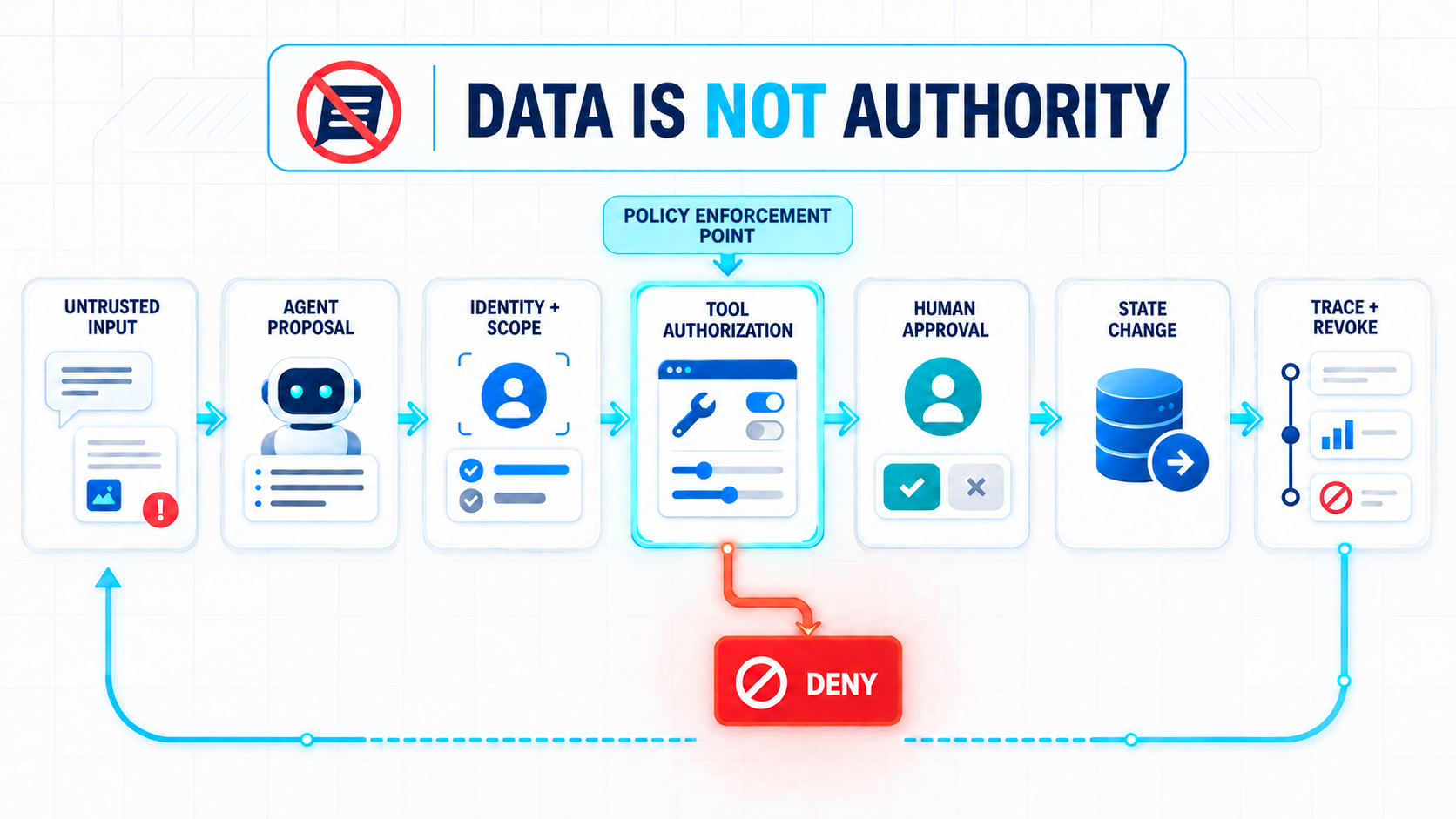
An AI agent should have a distinct, lifecycle-managed identity with a named owner, an approved purpose, explicit data scope, and a record of which tools it may use. A shared API key or ambiguous service account can make it difficult to determine which agent acted, which user authorized the action, and how access should be revoked.
Microsoft’s least-privilege guidance recommends a dedicated agent identity, documentation of purpose and dependencies, review of effective permissions across tools and downstream systems, default denial of unreviewed tools and cross-tenant paths, action-level logging, and tested revocation. Google similarly recommends an agent identity with only the roles required for the task.
The identity model must distinguish delegated access from autonomous access. A user-facing agent may act on behalf of a signed-in user, while an autonomous agent acts under its own identity. Both require policy checks. “The user asked” is not a substitute for verifying whether the user and agent are authorized to perform a particular action on a particular resource.
What does Least Privilege Mean for an AI Agent?
Least privilege means giving an agent the smallest useful level of authority for each task, tool, resource, tenant, and time window. It is not enough to give an agent a narrow role in one system if its combined permissions across several tools allow a broader end-to-end action.
A search tool should be read-only over approved content. A draft-email tool should not have send permission.
A CRM update tool should be limited to approved fields and the current customer scope. A provisioning tool should use the narrowest role at the smallest practical resource scope. These are policy decisions enforced by the tool service, not suggestions placed in the prompt.
Microsoft identifies permission creep and excessive aggregate privilege as distinct problems. Teams may grant broad roles to support a pilot and fail to narrow them afterward. Several individually narrow roles can also combine to create excessive authority. Review effective permissions across the complete workflow, then test revocation by disabling the agent, rotating credentials, invalidating tokens, and removing stale assignments.
How do You Secure Agent Tools and MCP Servers?
- Secure every tool as an independent application boundary.
- Register approved tools, authenticate the calling agent, validate arguments against the user’s scope, isolate tenants, restrict egress, rate-limit recursive calls, and return only the minimum necessary data.
- Treat an MCP server or plugin as code and an integration dependency, not as harmless context.
Google notes that MCP servers can allow agents to make changes that are not reversible. Its guidance distinguishes human-in-the-middle operation, where a person approves each action, from agent-only operation, where security depends on how the system is programmed. The latter can be exposed to prompt injection, insecure tool chaining, and inadequate error handling.
A tool contract should state its purpose, accepted arguments, resource scope, side effects, idempotency behavior, approval class, and error format. The runtime should deny unknown tools by default. It should also prevent a read tool from being transformed into a write capability through a chain of individually valid calls.
When should a Human Approve an Agent Action?
Require human approval for actions that are sensitive, irreversible, externally visible, high-impact, or difficult to reverse, but treat approval as one security layer rather than the entire security system. The approval request should show the exact action, parameters, target, identity, evidence, and expiry so the person approves a defined operation rather than a general summary.
OWASP recommends parameter-bound, unexpired approvals for high-impact actions. Google warns that human-in-the-middle operation can still be vulnerable when a person approves a malicious or destructive action because they trust the agent’s suggestion.
The safer pattern is policy first, approval second: the authorization layer determines that the action is eligible, and a human then confirms the specific permitted operation.
Low-risk, reversible, read-only work can often proceed without an approval gate when identity, scope, logging, and rollback controls are sound. The threshold should be defined before deployment. Otherwise, each team member may make a different judgment about what the agent is permitted to do autonomously.
How do you Protect Agent Memory and Retrieved Context?
- Protect memory and retrieved context as untrusted, scoped state.
- Validate content before persistence, separate tenant and user memory, restrict who can write durable memory, expire data that no longer serves a purpose, and record the provenance of important facts.
A model’s context window is not an audit log or an authoritative database.
OWASP identifies memory poisoning as a risk because malicious content can persist beyond the interaction in which it was introduced. Google recommends isolating memory and state between users, tenants, and agents, and protecting sensitive data in transit and in memory.
Retrieval systems require the same separation.
- Store source text and policy metadata in different fields.
- Mark whether a passage is evidence, an instruction, a user claim, or an agent-generated proposal.
The retriever can provide a document to summarize without giving that document authority to call a tool. Before a state-changing action, verify facts against a trusted system of record.
What should you Log and Monitor for an AI Agent?
Log the causal chain of every meaningful run: agent identity, user identity where applicable, purpose, model and prompt version, retrieved sources, tool request and result, arguments, effective permissions, approval record, state mutation, correlation ID, verification result, and termination reason. Monitoring only the final answer can hide the action that created the risk.
Microsoft specifically calls for logging identity, role, effective scope, action, resource, correlation ID, and the on-behalf-of user where applicable. OWASP’s testing guidance also includes recursion, retry, token, cost, approval-bypass, and multi-agent chaining checks.
Alert on behavior, not only errors. Examples include a read-only agent requesting a write tool, repeated denied calls, a new cross-tenant target, unusual tool-chain depth, attempts to store instruction-like text in durable memory, or a high-impact action without a matching approval. A kill switch must revoke tokens and downstream access, not merely hide the chat interface.
The full instrumentation model for tracing agent actions — what to capture, how to structure traces, and what anomalies to surface — is covered in AI Agent Observability.
How do you Test an AI Agent before Production?
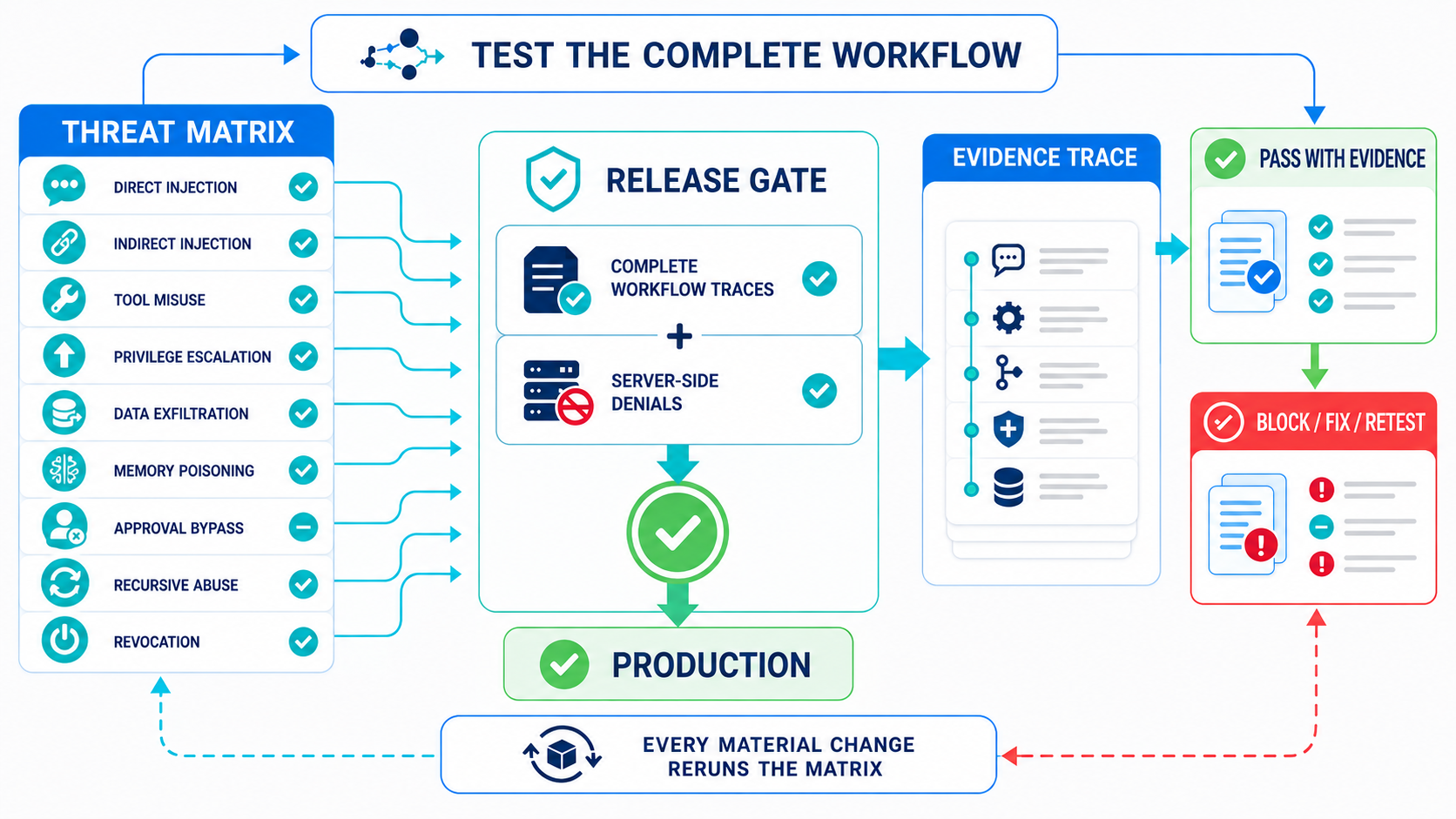
- Test the complete agent workflow repeatedly against an explicit threat matrix and a simpler baseline.
- Include normal tasks, direct and indirect prompt injection, poisoned retrieval, malicious tool results, unauthorized resources, expired approvals, duplicate requests, partial tool failure, missing data, tenant crossover, memory poisoning, recursive loops, and revocation.
InjecAgent demonstrates why tool-integrated testing matters: its benchmark covers 17 user tools and 62 attacker tools rather than testing a model in isolation. OWASP recommends repeating security tests after material changes to prompts, tools, memory, retrieval, policies, or model providers.
| Test | Pass Condition |
|---|---|
| Prompt override | Retrieved or user content cannot replace higher-priority policy |
| Tool misuse | Unauthorized tool or argument is denied server-side |
| Privilege escalation | A low-trust run cannot reach privileged resources |
| Data exfiltration | Sensitive data is not leaked through tools, logs, citations, or output |
| Memory poisoning | Untrusted content is rejected, scoped, sanitized, or expired |
| Approval bypass | High-impact action needs a valid, parameter-bound approval |
| Recursive abuse | Depth, retry, and tool-call limits terminate runaway behavior |
| Revocation | Disabling the agent invalidates active access and downstream tokens |
| Multi-agent boundary | One compromised agent cannot expand another agent’s authority |
Record both the result and the evidence. A successful test without a trace cannot adequately support a release decision.
What is a Practical AI Agent Security Checklist?
Use the following checklist as a design-review gate. Each box should have an owner and evidence, not only a yes or no answer.
| Boundary | Checklist |
|---|---|
| Identity | Dedicated identity, named owner, approved purpose, lifecycle and revocation path |
| Authorization | Least privilege by tool, resource, tenant, action, and time; server-side enforcement |
| Inputs | User, web, email, retrieved text, memory, and tool results treated as untrusted data |
| Tools | Approved registry, argument validation, side-effect classification, egress controls, rate limits |
| State | Single authoritative writer, provenance, tenant isolation, idempotency, rollback or compensation |
| Approvals | Written risk classes, exact parameters shown, expiry, approver identity, recorded decision |
| Observability | Correlated trace from request through tool call, state mutation, approval, and termination |
| Testing | Abuse-case matrix rerun after changes; full workflow tested against a simple baseline |
| Response | Kill switch, token invalidation, key rotation, incident owner, preserved forensic trace |
Security becomes operational when every boundary has an enforcement point and a failure path. If a control exists only inside the prompt, it is guidance for the model, not a guarantee for the business.
What this Means in Practice
AI agent security is an authorization and control-plane problem built around a probabilistic component. Prompt hygiene matters, but it cannot determine identity, scope, approval, or whether a state change is safe.
Start with one narrow workflow. Give the agent a distinct identity, expose the smallest useful tools, separate data from instructions, place policy checks before execution, and trace every action. Then test the complete run against injection, privilege abuse, poisoned memory, tool failure, and revocation. Expand autonomy only when the evidence shows that the boundary is holding.
The organizational controls that determine which agents are permitted, who owns the risk, and what evidence must be retained connect to an AI governance framework — the layer above individual agent design.
FAQ
1Is Prompt Injection the Main AI Agent Security Risk?
Prompt injection is important, especially when an agent reads external content, but it is one part of a broader system risk. Tool misuse, excessive permissions, memory poisoning, data exfiltration, approval manipulation, and cascading failure can also create harm. The stronger design approach assumes injection will occur and limits what the resulting tool request can do.
2Do AI Agents Need their Own Identity?
Yes, when an agent accesses enterprise systems or performs autonomous work. A distinct identity with a named owner makes scope, audit, lifecycle, and revocation explicit. Delegated user access can be appropriate for interactive workflows, but it still requires action-level authorization and logging. Shared credentials make accountability and containment more difficult.
3Does Human Approval Make an AI Agent Safe?
No. Approval can reduce risk for selected high-impact actions, but a person can approve a harmful suggestion if the agent’s explanation is trusted without sufficient verification. The system should first authorize the exact action and parameters, then request approval when policy requires it. Approval must be bounded, recorded, and time-limited.
4How do you Secure an MCP Server used by an AI Agent?
Register and review the server, authenticate the agent, grant only the required permissions, validate every argument and resource target, isolate tenants, limit returned data, and monitor the full call chain. Unknown tools should be denied by default. Treat MCP as an integration boundary that can create side effects, not as a passive document source.
5What should an AI Agent Security Test Include?
Test direct and indirect prompt injection, unauthorized tools, privilege escalation, data exfiltration, poisoned memory, approval bypass, recursive tool abuse, duplicate requests, partial failures, cross-tenant access, and revocation. Run complete workflows repeatedly, preserve traces, and rerun the matrix after changes to prompts, tools, retrieval, memory, policies, or model providers.
6What is the First Security Control to Add to an AI Agent?
Start by defining the agent’s purpose, identity, allowed tools, resources, side effects, and stop conditions. Then enforce authorization outside the model before any tool executes. This creates a measurable boundary. Prompt rules and output checks are useful layers, but they should not be the only controls between a model decision and a production action.
Building an AI Agent and Not Sure Where to Start on Security?
Identity, authorization, tool contracts, and observability are the first four decisions that shape everything else. That is where an engagement with Realisier Labs begins.